



Kadam Introduces KAI: A Personal AI Assistant for Campaign Management
- June 12, 2026
- by Affbank Team
- Reviews: 0
Kadam has recently launched its MCP server, a tool that allows external AI agents to connect to the platform’s capabilities and manage advertising through familiar AI tools.
Now Kadam is bringing the same AI-first approach directly into the platform interface.
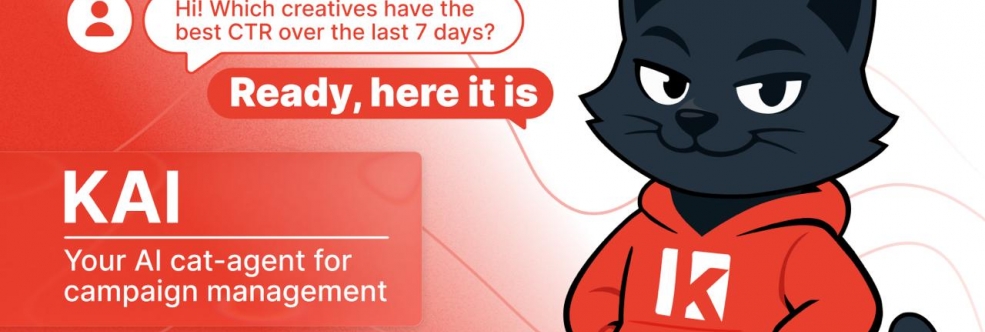
Meet KAI, Kadam’s personal AI cat-agent. It helps launch campaigns, review statistics, find the reasons behind performance drops, and make optimization decisions faster. All through a simple chat.
What Is KAI
KAI is an AI agent built into the Kadam interface as a widget. It works like a personal ad manager: it understands natural language requests, helps manage campaigns, performs actions in the account, and finds areas for improvement.
Inside the Kadam interface, KAI covers a wide range of scenarios: it helps check statistics, investigate performance drops, manage settings, work with postback, API requests, source optimization, and much more. That makes it useful not only for quick answers, but also for everyday campaign management.
You no longer need to search for the right report manually, open dozens of tabs, or check every setting one by one. Just ask KAI in the chat, for example:
“Why is my campaign not getting impressions?”
“Show me sources that spent budget without conversions”
“Which creatives have the best CTR over the last 7 days?”
“How do I set up postback with a tracker?”
“Help me write a GET request to the API to get statistics”
Who KAI Is For
KAI is currently available to Kadam advertisers: from those launching their first campaigns to experienced teams working with high traffic volumes. Access for publishers will be opened next week.
For advertisers, KAI helps with different tasks depending on their experience and workload. For beginners, it makes it easier to understand the interface, formats, and settings. For experienced media buyers, it saves time on checking statistics, diagnosing issues, adjusting bids, and working with sources.
Kadam offers many tools for traffic management: native, push, banner, popunder, in-page, video, flexible targeting, auto rules, blacklists and whitelists, and individual bids by source. KAI makes this functionality easier to use through a simple chat dialogue.
What KAI Can Do
Campaign Launch and Management
KAI helps create campaigns, choose the format, set up GEOs, budget, payment model, and other parameters. If some details are missing, it will ask clarifying questions and suggest what needs to be added before launch.
Creatives
With KAI, you can manage creatives, change statuses, check parameters, and prepare materials for launch faster.
Statistics and Analytics
Spend, clicks, conversions, CPA, CTR, and other metrics can be requested directly in the chat. KAI shows data for the selected period and breaks it down by campaigns, GEOs, formats, sources, or creatives.
Problem Diagnostics
If a campaign is not receiving traffic, KAI helps quickly check the possible reasons: moderation status, targeting settings, bid level, and other parameters. Instead of going through everything manually, the advertiser gets a clear explanation of where the issue might be and what to check next.
Optimization
KAI helps find weak spots in campaigns: sources with no conversions, GEOs with high CPA, creatives with low CTR, or campaigns with uneven budget spend. Based on account data, it can suggest specific actions: adjust bids, disable inefficient sources, check settings, or update auto rules.
Monitoring
KAI helps monitor active campaigns and notice changes in metrics faster: CPA growth, CTR drops, fewer conversions, or sudden spend spikes. This is especially useful when there are many campaigns in the account and manual control takes too much time.
A/B Tests and Benchmarks
KAI analyzes which creatives perform better and helps compare results by key metrics. This makes testing easier and helps identify which combinations are worth scaling.
Support
Questions about the account, settings, or platform features can be asked directly in the chat. KAI helps find answers without a long search through the interface.
KAI is now live in Kadam. Open the widget and try managing your campaigns through AI chat.
Recent Posts
October 06, 2026
Best Ad Spy Tools for Affiliate Marketing in 2026
Ad spy tools let you see what other affiliates are running, which creatives they use, and how long t...
Read moreSeptember 17, 2026
Webcam vs. AI Girlfriend: How Adult Offers Differ in 2026
Webcam has been one of the core verticals in adult affiliate marketing for years. Now, AI Girlfriend...
Read moreJuly 14, 2026
adset.pro Review: Tracker, PWA and Gaming Landers in One Stack for iGaming Buyers
In iGaming media buying, the biggest leak is often not the creative, not the offer, and not even the...
Read more
Written by
Affbank Team
Hey there! We combined years of experience, a ton of enthusiasm and our hunger for knowledge to give you the best that we can - Affbank. Leave a comment or reach us by email support@affbank.com